How to plan an MCP server before you build it
A practical planning guide for MCP server development: pick one workflow, list the tools, decide who can do what, and define what finished looks like before any code is written.
The Gihonix team · · 4 min read
Key takeaways
- Start with one real workflow and one group of users, not "connect everything".
- Design a small set of clearly named tools, and make the first version read-only.
- Decide permissions, logging and success tests during planning, not after launch.
Planning an MCP server means deciding, before any code exists, which single business workflow an AI assistant should help with, which systems it needs to reach, what it may read or change, and how you will know it works. A good plan fits on two pages and makes the build far cheaper and safer.
If you are new to the idea, read what an MCP server is first. In short, the Model Context Protocol (MCP) is an open standard that lets AI assistants connect to your tools and data in a consistent way. The official introduction is at modelcontextprotocol.io.
Step 1: What problem is the MCP server solving?
Write one sentence in the form: "When [person] needs [answer or action], the assistant should [do this] using [system]." For example: "When a support agent needs an order status, the assistant should look it up in the order system."
If you cannot write that sentence, you are not ready to build. "Connect our AI to all our data" is a wish, not a project.
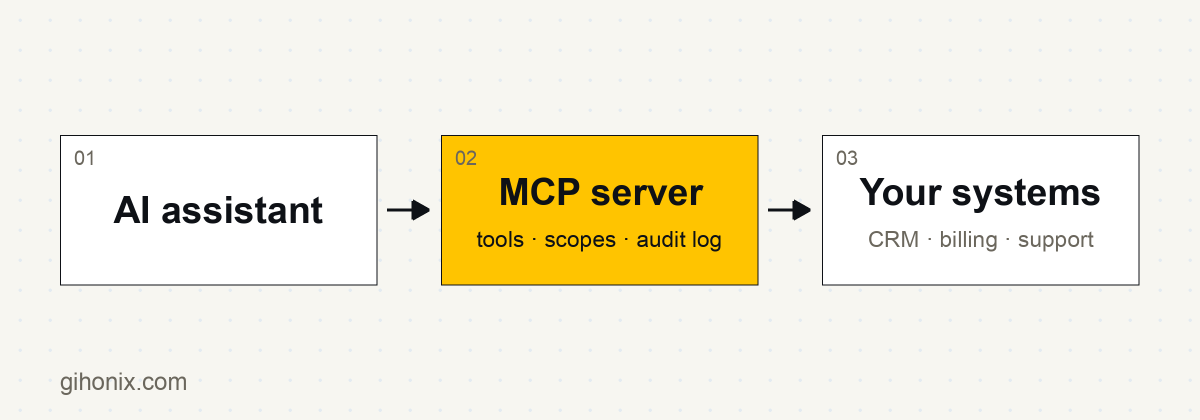
Step 2: Which systems and data does it need?
List every system the workflow touches: a database, a CRM, a shop platform, a document store, an internal API. For each, note:
- who owns it and who can approve access
- whether an API already exists, or one must be built
- how clean and current the data is
- how sensitive the data is (customer details, pricing, payroll)
Often the slowest part of a project is not the server, it is getting access to a messy system. Finding that out during planning is a gift.
How do you decide what tools to expose?
Tools are the actions an assistant can call. Keep the first list short, usually three to eight. A useful rule: one tool, one clear job, one plain-English name and description.
| Weak tool | Better tools |
|---|---|
manage_orders |
get_order_status, list_recent_orders, search_orders_by_email |
do_crm_stuff |
find_contact, get_deal_summary |
Vague tools make the assistant guess. Specific tools make its behaviour predictable. Our guide to MCP tools, resources and prompts explains the three building blocks you can choose from.
Step 4: Who can do what?
Decide permissions on paper first.
- List the roles (support agent, sales rep, manager).
- For each tool, mark read or write.
- Start with read-only. Add write actions later, one at a time, each with its own approval rule.
- Decide which actions always need a human to confirm.
The security side is covered in depth in how to secure an MCP server.
What should the plan say about quality and monitoring?
Agree these before building:
- Test questions. Write 20 to 50 real questions with the right answers. These become your acceptance tests.
- Logging. Which calls are recorded, who can see the logs, how long they are kept.
- Failure behaviour. What the assistant should say when a system is down or a record is missing.
- Owner. A named person who watches usage and fixes problems after launch.
A planning checklist
- One workflow, one sentence problem statement
- Named users and a named business owner
- Systems, data owners and access approvals listed
- First tool list (three to eight tools), all read-only
- Roles and permissions mapped
- Test questions with expected answers
- Logging and retention decided
- A pilot group and a date to review results
How long should the first version take to scope?
For most small projects, scoping is a matter of a few conversations and a short document, not months of analysis. What changes the timeline is the number of systems and how ready their APIs are. See what drives MCP server cost for the factors that matter.
Work with Gihonix
Gihonix is a software, AI and web development company based in Coimbatore, India, working with businesses locally, across India and worldwide. Our MCP development service starts with exactly this kind of planning workshop, and you can contact us to talk through your workflow.
Frequently asked questions
Do we need a technical team to plan an MCP server?
No. The planning questions are about workflows, people and permissions, which business owners answer best. A developer helps with systems and feasibility.
Should the first MCP server be read-only?
Yes, in almost every case. Read-only access lets you test accuracy and usefulness with very little risk. Add actions that change data later, with approvals.
How many tools should an MCP server have?
Start with three to eight well-named tools. A long list of overlapping tools confuses the assistant and makes testing harder.
What is the biggest planning mistake?
Trying to cover every department at once. One workflow with a clear owner and test questions beats a broad project with no finish line.