How to build an AI agent with human approval steps
A step-by-step guide to building an AI agent with human approval: classify actions by risk, design clear approval requests, handle rejections and keep a record of every decision.
The Gihonix team · · 4 min read
Key takeaways
- Sort every action by risk, and require a human decision for the ones that are costly or hard to undo.
- A good approval request shows what the agent wants to do, why, and what changes if you say yes.
- Record every approval, rejection and edit; they are your audit trail and your best training data.
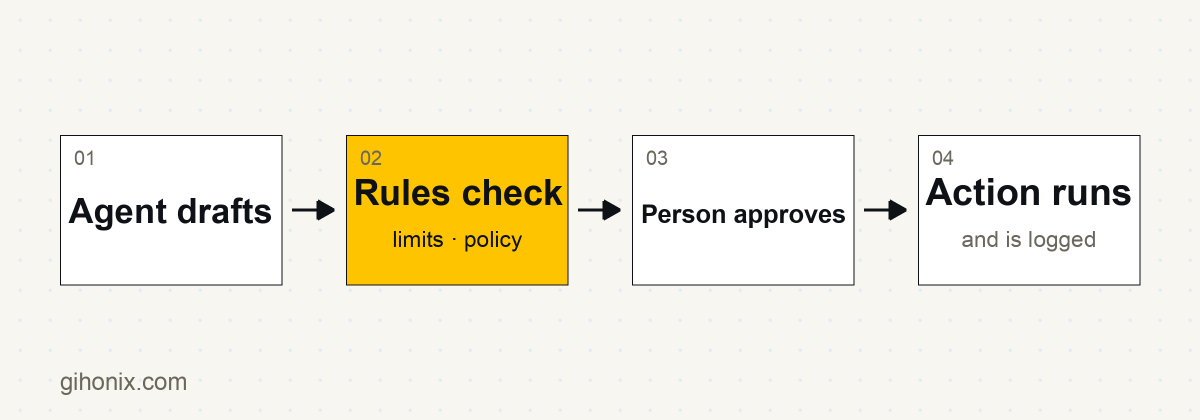
An AI agent with human approval steps does its preparation work on its own but pauses for a person to approve, edit or reject any action that is risky, costly or hard to undo. This "human in the loop" design gives you the speed of automation while keeping accountability with a named person.
If you are unsure what an agent is, read AI agents vs chatbots vs workflows first. This guide shows how to design the approval layer.
Step 1: Which actions need approval?
List every action the agent could take, and rank each by two questions: how bad is a mistake, and can it be undone?
| Risk | Examples | Rule |
|---|---|---|
| Low | Read a record, search documents, draft text | Agent acts freely, logged |
| Medium | Add an internal note, create a draft quote, book a tentative slot | Agent acts within limits, logged and sampled |
| High | Send an email to a customer, issue a refund, change a price, delete data, spend money | Human approval every time |
When in doubt, treat an action as high risk until testing proves otherwise.
Step 2: How should the approval request look?
A person can only decide well if the request is clear. Each request should show:
- The proposed action in plain words ("Send this email to this customer").
- The exact content that will be sent or changed.
- The reason, with the facts or records the agent used.
- The effect of approving, and whether it can be undone.
- Three choices: approve, edit then approve, reject with a reason.
Avoid vague prompts such as "Proceed?". People click through vague prompts without reading them.
Step 3: Where does the approval happen?
Put approvals where people already work: a ticket in the helpdesk, a message in a team chat, an email digest, a simple internal dashboard. Make the route to the decision short. Slow approvals lead to workarounds.
Decide who may approve what, and who covers when they are away. Large amounts or sensitive actions might need two people.
Step 4: What happens on rejection or no response?
Design the unhappy paths explicitly:
- Rejected: the agent stops, stores the reason, and does not retry the same action unchanged.
- Edited: the agent uses the edited version and records the difference.
- No response: the action expires safely after a set time. It should never be sent automatically because nobody answered.
- Conflict: if the underlying record changed while waiting, the agent re-checks before acting.
Step 5: How do you limit what the agent can do?
Approvals work best with other safeguards:
- narrow permissions and read-only tools first; see how to secure an MCP server
- caps on volume, amounts and recipients
- treating text from emails and web pages as untrusted, since it may contain hidden instructions
- a kill switch that stops the agent immediately
Step 6: How do you keep a record?
For every action, log the request, the decision, who decided, when, and the result. This audit trail helps with reviews, disputes and compliance discussions. See also testing and monitoring.
Step 7: How do you reduce approvals over time?
Review the log. If a type of action is approved unchanged hundreds of times with no problems, you may decide to move it to a lower tier with sampling instead of approval. Make that a deliberate, documented decision by a person, not something the agent drifts into. If a type is frequently edited or rejected, improve the agent or keep the approval.
A build checklist
- Actions listed and ranked by risk
- Approval rules per tier, with named approvers
- Clear approval request format with approve, edit, reject
- Expiry and fallback rules for no response
- Permissions and limits enforced on the server, not only in instructions
- Full logging of requests and decisions
- Tested on realistic cases; see evaluating AI outputs
- A scheduled review of approval patterns
Does approval make the agent slow?
Only for the steps that matter. The agent still gathers information, drafts and prepares instantly. The person spends seconds on a decision instead of minutes on the preparation. For many teams that is the sweet spot between full manual work and full automation.
Work with Gihonix
Gihonix is a software, AI and web development company based in Coimbatore, India. We build agents with approval flows through our AI agents and chatbots service and can set the rules with you under AI governance. Contact us to discuss a use case.
Frequently asked questions
What does human in the loop mean?
It means a person reviews or approves certain AI actions before they take effect. The agent prepares; the human decides on risky steps.
Which actions should always need approval?
Anything that contacts customers, moves money, changes prices or deletes data, or that cannot easily be undone.
What if the approver does not respond?
The action should expire safely and wait. It should never go ahead by default.
Can approvals be removed later?
Possibly, for low-risk actions that have a long clean record, as a deliberate decision by a responsible person with ongoing sampling.